Most maps draw mountain passes (saddles) with a small symbol that is oriented along the low ridge line from valley to valley. Unfortunately, OpenStreetMap’s ‘natural=saddle’ nodes rarely include a ‘direction=*’ tag, so renderers don’t know which way to rotate the symbol. OpenTopoMap uses a small program to estimate the direction from digital elevation data.
Why the direction matters
A saddle is the lowest point on a ridge between two peaks. It sits where two valleys meet; travellers cross over it when moving from one valley to another. Maps convey this by drawing a symbol that is elongated along the valley axis rather than across the ridgeline. Providing the correct orientation makes it clear which way the pass runs and distinguishes it from a peak symbol.
Algorithm summary
OpenTopoMap’s ‘saddledirection.c’ utility reads a GeoTIFF digital elevation model (DEM) and a list of saddles. For each saddle without a valid ‘direction’ tag it performs the following steps:
Sample heights on a circle. Create a circle (default radius 100 m) around the saddle and sample evenly spaced points on the circle. Each point’s elevation is obtained by bilinear interpolation from the DEM.
Compute the cross‑difference for each direction. For each sample direction i (0–180° because the symbol is symmetrical), calculate
\[
dh_i \;=\; h_i \;+\; h_{\,i+180^\circ}
\;-\; h_{\,i+90^\circ}
\;-\; h_{\,i+270^\circ}
\]
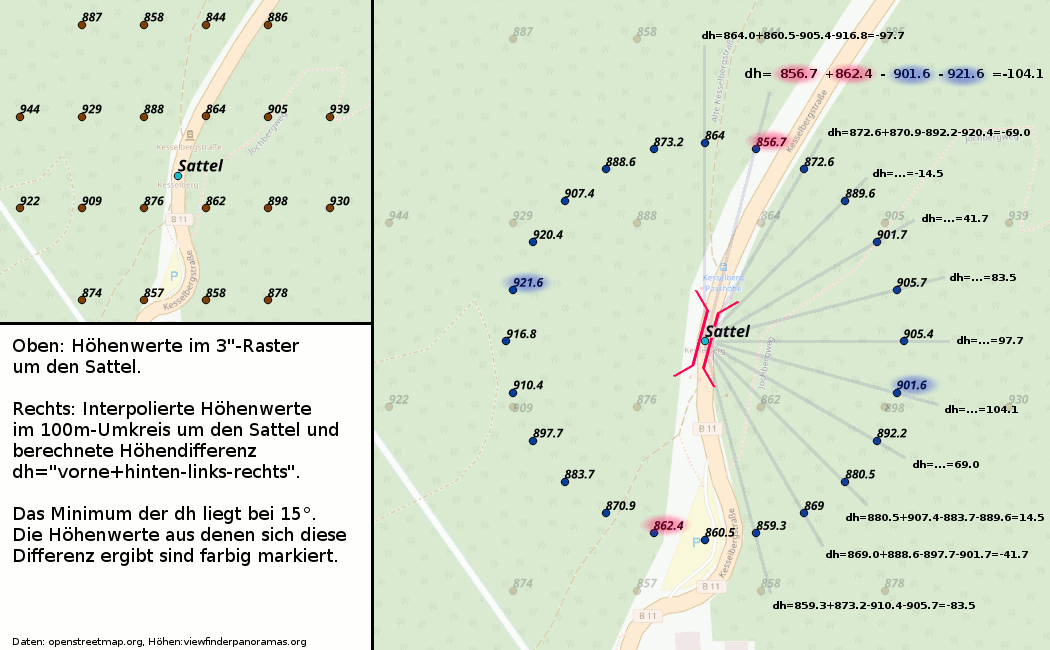
where hiis the sampled height at direction i. This “front + back – left – right” value measures how low the terrain is along the valley axis versus across it. Smoothing is applied when many samples are used.
Select the minimum. The direction with the minimum dhi is the valley axis because it is lowest ahead and behind and highest on either side. The program outputs this direction (0–179°) for the saddle.
Illustration
The example below shows how the cross‑difference method works. The left panel contains the original height points (3″ SRTM data) around a saddle. The right panel shows the heights sampled on a 100 m radius circle. The numbers at the ends of the rays are the computed dh values. The smallest value occurs at 15°, so the saddle’s direction is north‑east/south‑west. Only half the circle needs to be evaluated because the saddle symbol is symmetrical.
Notes on accuracy
This method gives a reasonable approximation but has limitations. DEM data may be too coarse or misaligned relative to the mapped saddle position, and the 100 m radius may not capture the valley axis in flat areas or highly curved terrain. Nevertheless, it allows OpenTopoMap to orient most saddle symbols without requiring mappers to add ‘direction=*’ tags.